


RimWorld Together server hosting
One shared RimWorld planet for every colony in your group
Host a RimWorld Together server so your friends' colonies share one planet to trade, visit and raid. Enforce a mod list, keep a whitelist, play on your hours.
Staying longer? Subscribe and get 50% off your first month
- DDoS protected
- 24/7 support
- Live the moment you pay

- Split the billUp to 10 friends, own cards
- Custom plansAny RAM up to 32 GB
- Prepaid or monthly3 days to 1 year
- Live in 60 secondsNo setup, no waiting
- Cancel any timeNo contracts, ever
Pick your RimWorld Together plan
Every plan is live the moment you pay. Upgrade or cancel from your dashboard any time.
Starter
2 GBThen $4.99/mo. $0.17 a day.
- 2 GB RAM
- 2 vCPU cores
- DDoS protection included
- 24/7 support
Standard
4 GBThen $9.99/mo. $0.33 a day.
- 4 GB RAM
- 2 vCPU cores
- DDoS protection included
- 24/7 support
Pro
8 GBThen $19.99/mo. $0.67 a day.
Splitting with 3 friends? $6.02 each/mo
- 8 GB RAM
- 2 vCPU cores
- DDoS protection included
- 24/7 support
What comes set up on a RimWorld Together server
One planet, many colonies
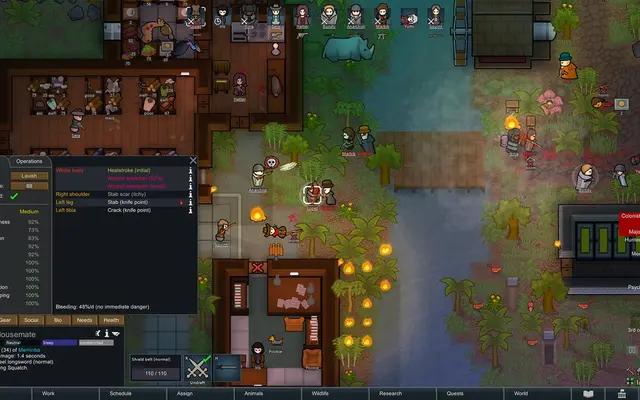
Every player runs their own colony on the same world map, with caravans, trades and raids between real neighbors.
Enforced mod lists
Mark mods as required, optional or forbidden in ModConfig.json so nobody joins with a list that breaks the shared world.
Keep it to your group
Set a join password in PasswordConfig.json, so only your community can claim a spot on the planet.
Pick the mod version
Set the server's RimWorld Together version in the panel to match what your players have from the Workshop.
A look inside RimWorld Together
Real screenshots from the game. Click any of them to see it full size.
How much RAM does a RimWorld Together server need?
Find the row that sounds like your group and we will point you at the right plan.
| Your server | RAM | Plan |
|---|---|---|
| Friend group with a light mod list | 2 GB | Starter$4.99/mo |
| Community of 10 to 30 colonies | 4 GB | Standard$9.99/mo |
| Public server with dozens of colonies and big saves | 8 GB | Pro$19.99/mo |
This is the panel. Click around.
This is the RimWorld Together panel you get. Click any button, or type a command.

RimWorld Together Server
play.gamezservers.com:7777
[12:00:00] Starting RimWorld Together server
[12:00:03] Loading world
[12:00:06] Server started on port 7777
[12:00:09] Ready for players. Try a button.
Power
How to join your RimWorld Together server
- 1
Subscribe to RimWorld Together on the Steam Workshop and enable it, plus Harmony, in RimWorld's mod list.
- 2
Match the server's required mods and load order, then restart RimWorld.
- 3
Click Play Together on the main menu and choose to connect by IP.
- 4
Type the IP and the port from
203.0.113.24into their separate fields and confirm. - 5
Register or log in with a username for this server, then pick a starting site for your colony on the shared map.
Common problems
Can't connect? Nine times out of ten the mod version differs. Everyone needs the same RimWorld Together build as the server, so update the Workshop item or change Version in the panel.
Rejected for mods? The server checks your mod list against its enforced list. Turn on every required mod, turn off forbidden ones and keep the same load order.
New releases often say saves are not fully compatible. Take a backup in the panel before you update the server version.
The IP and the port go into separate fields in the mod's connect screen. Paste only the IP in the first box and the port number in the second.
Server not responding
Make sure the server is online. Servers sleep after 4 days with nobody playing, and anyone with access can start them again from the dashboard in one click.
Use the server address
Do not use localhost, 127.0.0.1 or your own IP from a home hosting guide. Copy the exact address of the server.
No port forwarding or firewall changes
Opening ports on your router is only for hosting a server at home, so there is nothing to change to join this one. If Windows asks whether to let the game through the firewall, choose Allow.
Modding your RimWorld Together server
Players get mods from the RimWorld Steam Workshop, and the server enforces which ones must match through its mod config. Content mods that change world generation, factions or biomes should always be set as required.
RimWorld Together server hosting, explained
RimWorld Together is a fan-made mod, not an official Ludeon Studios release, that puts every player's colony on the same planet. You still play your own colony at your own pace, pause included. What changes is the world around you: the settlement down the river belongs to a friend, the market has goods other players sold, and that caravan coming over the hills might be a raid from someone you annoyed last week. It tracks the latest RimWorld version, including Odyssey content like asteroids.
The server is what holds the shared planet together. It stores settlements, saved colonies and world objects, so players log in when they like and still find their neighbors where they left them. Visits and raids work off copies of other colonies kept on the server, which is why it needs to stay online even when the person who set it up is asleep. That is the main reason groups move off a home PC.
Admins get real control through the server's config files, all reachable in the file manager or over SFTP. You can enforce a mod list and load order, set a join password, change the max players and turn on verbose logs when something misbehaves. In the panel you also pick which RimWorld Together version the server runs, which is handy when a new release lands and half your players have not updated yet.
The colonies run on each player's own PC, so the server mostly stores and relays world data. It is light. A small friend group fits in 2 GB, a community with a few dozen colonies sits well on 4 GB, and 8 GB gives room for a big public world with lots of saved settlement data and backups. If it ever feels tight, change plans in the panel.
RimWorld Together server guides
RimWorld Together6 min readHow to Back Up and Update a RimWorld Together Server Safely
Back up a RimWorld Together server with BackupConfig.json and the backup command, update to a new release without losing the planet, and restore or reset.
ReadRimWorld Together7 min readRimWorld Together Can't Connect to Server: Every Cause and Fix
Fix RimWorld Together join failures: version mismatch, mod and load order mismatch, wrong login, a full server, TCP port 25555 and admin only access.
ReadRimWorld Together7 min readHow to Host a RimWorld Together Server (2026 Guide)
Host a RimWorld Together server: download the GameServer release, TCP port 25555, ServerConfig.json and ModConfig.json, op commands and matching mods.
ReadIncluded on every plan
- Always on DDoS protection
- 24/7 support from real people
- Low ping game hardware
- Live the moment you pay
- Your own address and port
- Live console with full access
- One click game actions
- One click backups
- Upgrade or cancel any time
Common questions
How many players can join a RimWorld Together server?
Our setup defaults to 100 and you can set anything up to 150 in the panel. Colonies run on each player's PC, so your community size is the real limit.
Do players need to own RimWorld?
Yes. RimWorld Together is a mod, so every player needs RimWorld on PC and the mod from the Steam Workshop. Harmony is required as well.
Why can't I connect to my RimWorld Together server?
Usually a version mismatch. The mod on each player's game has to match the server, and you can change the server's version in our panel to line them up.
Can I make everyone use the same mods?
Yes. The server's mod config lets you mark mods as required, optional or forbidden. Players with a list that does not match get turned away, which prevents broken worlds.
Do DLCs like Biotech or Odyssey work?
Yes, they are treated like mods. If you want everyone on the same DLC set, add their package IDs as required in ModConfig.json.
How do I keep strangers out?
Set a password in PasswordConfig.json and share it with your group. Restart the server from the panel after editing it.
Will an update wipe our world?
Some RimWorld Together releases change save formats and warn that old saves may not carry over. Take a backup in the panel before changing the server version, so you can roll back.
Is RimWorld Together made by Ludeon Studios?
No. It is a community project. Ludeon makes RimWorld but does not make or support the mod, so mod bugs go to the mod's own Discord and GitHub.
Is GamezServers affiliated with RimWorld Together?
No. You rent and control your own dedicated RimWorld Together server. GamezServers is not affiliated with the game's developer or publisher.
Can my friends and I split the cost?
Yes. At checkout choose "Me and my friends" and up to 10 people each pay their own share with their own card, on any plan length, from 3 days to a year. It is not a payment plan: nobody pays in parts over time, each friend simply pays their own share. You pay yours, send each friend their link, and the server starts straight away. Each share includes a $1 payment fee.
Can I build a custom plan?
Yes. Every game has a Build your own page: pick any amount of RAM up to 32 GB, any length from 3 days to 1 year, prepaid or a subscription, plus your server type and settings. A custom size costs 15% more per GB than the standard plans next to it.
Can I pay once instead of a subscription?
Yes. Pick Prepaid and pay once for 3 days, 30 days, 6 months or a year. Nothing renews: when the time is up the server pauses and keeps its world for 14 days. Add time or switch to a subscription from your panel any time. Short rentals cost more per day, since every server is set up from scratch.
How fast is setup, really?
Your server starts building the moment Stripe confirms payment. Most are online in under a minute, and the address and login appear on your dashboard automatically.
Players who host RimWorld Together also host




Your RimWorld Together server is a minute away
One shared RimWorld planet for every colony in your group
Deploy RimWorld Together nowLive in 60 seconds · Cancel any time
GamezServers is not affiliated with RimWorld Together team. RimWorld Together and its art are trademarks of their respective owners.