


Sons Of The Forest server hosting
Keep your Sons of the Forest island alive between sessions
Host a Sons Of The Forest dedicated server for co-op horror survival with up to 8 players. Your base and save stay online, even when the usual host logs off.
Staying longer? Subscribe and get 50% off your first month
- DDoS protected
- 24/7 support
- Live the moment you pay

- Split the billUp to 10 friends, own cards
- Custom plansAny RAM up to 32 GB
- Prepaid or monthly3 days to 1 year
- Live in 60 secondsNo setup, no waiting
- Cancel any timeNo contracts, ever
Pick your Sons Of The Forest plan
Every plan is live the moment you pay. Upgrade or cancel from your dashboard any time.
Starter
6 GBThen $14.99/mo. $0.50 a day.
Splitting with 3 friends? $4.77 each/mo
- 6 GB RAM
- 2 vCPU cores
- DDoS protection included
- 24/7 support
Standard
8 GBThen $19.99/mo. $0.67 a day.
Splitting with 3 friends? $6.02 each/mo
- 8 GB RAM
- 2 vCPU cores
- DDoS protection included
- 24/7 support
Pro
12 GBThen $29.99/mo. $1.00 a day.
Splitting with 3 friends? $8.52 each/mo
- 12 GB RAM
- 3 vCPU cores
- DDoS protection included
- 24/7 support
What comes set up on a Sons Of The Forest server
Eight player co-op
The full co-op cap: one builds, one scouts, one gets dragged into the trees, and the base keeps growing either way.
Bring your own save
Upload a save from your PC and set its slot number in the panel to carry an existing island over to the server.
Pick the difficulty
Peaceful, normal, hard or hard survival for a new save, with the full game settings file open for custom rules.
Sleeps when nobody plays
Turn on Sleep when empty and the island saves and stops after 4 days with no one on. One click wakes it.
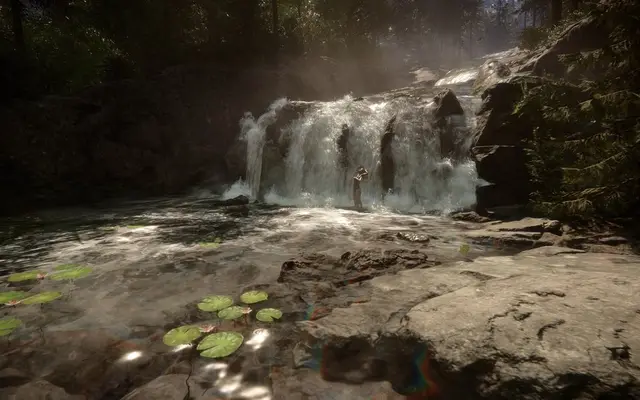
A look inside Sons Of The Forest
Real screenshots from the game. Click any of them to see it full size.
How much RAM does a Sons Of The Forest server need?
Find the row that sounds like your group and we will point you at the right plan.
| Your server | RAM | Plan |
|---|---|---|
| Two to four players on a fresh save | 6 GB | Starter$14.99/mo |
| Up to 8 players with growing bases | 8 GB | Standard$19.99/mo |
| Full server with large bases late in a save | 12 GB | Pro$29.99/mo |
This is the panel. Click around.
This is the Sons Of The Forest panel you get. Click any button, or type a command.

Sons Of The Forest Server
play.gamezservers.com:7777
[12:00:00] Starting Sons Of The Forest server
[12:00:03] Loading world
[12:00:06] Server started on port 7777
[12:00:09] Ready for players. Try a button.
Power
How to join your Sons Of The Forest server
- 1
Launch Sons Of The Forest and click Multiplayer, then Join.
- 2
Switch the Source toggle to Dedicated.
- 3
Search for your server by name and select it.
- 4
Click Join and enter the password from your panel if you set one.
Common problems
Can't find the server? In Multiplayer, then Join, switch the Source toggle to Dedicated. The default list only shows player hosted games.
The Gamemode setting only applies to new saves. Changing it does nothing to an existing island, so pick before the first start or use a new save slot.
Uploading a save from your PC? Copy the whole numbered save folder and put that number in Save Slot exactly, leading zeros included.
Players can't join right after a patch? Restart the server so auto update pulls the new build, then try again.
Server not responding
Make sure the server is online. Servers sleep after 4 days with nobody playing, and anyone with access can start them again from the dashboard in one click.
Use the server address
Do not use localhost, 127.0.0.1 or your own IP from a home hosting guide. Copy the exact address of the server.
No port forwarding or firewall changes
Opening ports on your router is only for hosting a server at home, so there is nothing to change to join this one. If Windows asks whether to let the game through the firewall, choose Allow.
Sons Of The Forest server hosting, explained
Sons of the Forest drops you on an island to find a missing billionaire and leaves you fighting cannibals, mutants and worse. You chop, build, craft and explore caves, and the island gets nastier the deeper you go. Co-op supports up to eight players, and groups split up naturally: someone builds the base, someone scouts, someone gets dragged off into the trees and has to be rescued.
In regular co-op the world belongs to the host, so when they log off everyone stops. A dedicated server fixes that. The island and your base persist, and anyone in the group can play when they want. You can also bring an island you started at home: upload the save folder and point the server at its slot number. Your progress, your stash and every wall you placed carry over.
Our panel sets the server name, password, max players, game mode for new saves (peaceful, normal, hard or hard survival), which save slot to load and auto updates. The server's own config file is in the file manager too, for settings like save interval and custom game rules. Endnight's dedicated server is a free tool, so nobody buys an extra copy for it.
This server tracks a big island, every log and wall you place and a lot of AI, so it is not light. Two to four players start well on 6 GB. A full eight player group should use 8 GB, and late saves with sprawling bases are happiest on 12 GB. You can change plans in the panel whenever the base outgrows the server.
Sons Of The Forest server guides
Sons Of The Forest4 min readCan't Join a Sons of the Forest Dedicated Server (Fixes)
Sons of the Forest server visible but joins fail or hang? Fix version mismatch, BlobSync port 9700, passwords, LanOnly and the 8 player cap.
ReadSons Of The Forest5 min readHow to Change Sons of the Forest Settings on an Existing Save
What you can change on an existing Sons of the Forest server save, why GameMode and custom settings are ignored, and how launch options override the cfg.
ReadSons Of The Forest6 min readHow to Host a Sons of the Forest Dedicated Server (2026)
Host a Sons of the Forest dedicated server: SteamCMD app 2465200, dedicatedserver.cfg, UDP ports 8766, 27016 and 9700, the 8 player cap and save transfer.
ReadSons Of The Forest5 min readHow to Move a Sons of the Forest Save to a Dedicated Server
Copy your numbered Multiplayer save folder to Saves/DedicatedServer/Multiplayer on the server, match SaveSlot, keep SaveMode on Continue, and protect your gear.
ReadSons Of The Forest6 min readSons of the Forest Dedicated Server Settings Explained
Every dedicatedserver.cfg key in Sons of the Forest explained: ports, MaxPlayers, SaveSlot, SaveMode, GameMode, custom game rules and ownerswhitelist.txt.
ReadIncluded on every plan
- Always on DDoS protection
- 24/7 support from real people
- Low ping game hardware
- Live the moment you pay
- Your own address and port
- Live console with full access
- One click game actions
- One click backups
- Upgrade or cancel any time
Common questions
How many players can join a Sons of the Forest server?
Eight. That is the game's co-op cap. Our setup starts at 4 and you can set anything from 1 to 8 in the panel.
How do I find my server in game?
Open Multiplayer, choose Join and switch the Source toggle to Dedicated. Find your server by name and enter the password.
Can I move my existing save to the server?
Yes. Upload the save folder from your PC through the file manager or SFTP, then set Save Slot in the panel to its number and restart.
Can I change the difficulty of an existing save?
Not through the Gamemode setting. It only applies when a new save is created, so pick the mode first or start a new save slot.
Does the server need its own copy of the game?
No. The dedicated server is a free tool on Steam. Each player still needs their own copy of the game.
Is there crossplay with consoles?
No. Sons Of The Forest is a PC game on Steam, so everyone on the server plays on PC.
What does Skip Network Test do?
The server checks it can be reached from outside on start. If that check fails and blocks startup, set it to true; players can still join normally.
How much RAM does a Sons of the Forest server need?
6 GB for a small group, 8 GB for a full eight player server, and 12 GB once bases get large.
Is GamezServers affiliated with Sons Of The Forest?
No. You rent and control your own dedicated Sons Of The Forest server. GamezServers is not affiliated with the game's developer or publisher.
Can my friends and I split the cost?
Yes. At checkout choose "Me and my friends" and up to 10 people each pay their own share with their own card, on any plan length, from 3 days to a year. It is not a payment plan: nobody pays in parts over time, each friend simply pays their own share. You pay yours, send each friend their link, and the server starts straight away. Each share includes a $1 payment fee.
Can I build a custom plan?
Yes. Every game has a Build your own page: pick any amount of RAM up to 32 GB, any length from 3 days to 1 year, prepaid or a subscription, plus your server type and settings. A custom size costs 15% more per GB than the standard plans next to it.
Can I pay once instead of a subscription?
Yes. Pick Prepaid and pay once for 3 days, 30 days, 6 months or a year. Nothing renews: when the time is up the server pauses and keeps its world for 14 days. Add time or switch to a subscription from your panel any time. Short rentals cost more per day, since every server is set up from scratch.
How fast is setup, really?
Your server starts building the moment Stripe confirms payment. Most are online in under a minute, and the address and login appear on your dashboard automatically.


Your Sons Of The Forest server is a minute away
Keep your Sons of the Forest island alive between sessions
Deploy Sons Of The Forest nowLive in 60 seconds · Cancel any time
GamezServers is not affiliated with Endnight Games. Sons Of The Forest and its art are trademarks of their respective owners.