


Post Scriptum server hosting
80 player WW2 battles for your clan, now under the Squad 44 name
Host a Squad 44 server, formerly Post Scriptum, for 80 player WW2 combined arms battles. Reserved slots, team balance, RCON and Workshop mod support.
Staying longer? Subscribe and get 50% off your first month
- DDoS protected
- 24/7 support
- Live the moment you pay

- Split the billUp to 10 friends, own cards
- Custom plansAny RAM up to 32 GB
- Prepaid or monthly3 days to 1 year
- Live in 60 secondsNo setup, no waiting
- Cancel any timeNo contracts, ever
Pick your Post Scriptum plan
Every plan is live the moment you pay. Upgrade or cancel from your dashboard any time.
Starter
8 GBThen $19.99/mo. $0.67 a day.
Splitting with 3 friends? $6.02 each/mo
- 8 GB RAM
- 2 vCPU cores
- DDoS protection included
- 24/7 support
Standard
12 GBThen $29.99/mo. $1.00 a day.
Splitting with 3 friends? $8.52 each/mo
- 12 GB RAM
- 3 vCPU cores
- DDoS protection included
- 24/7 support
Pro
16 GBThen $39.99/mo. $1.33 a day.
Splitting with 3 friends? $11.02 each/mo
- 16 GB RAM
- 4 vCPU cores
- DDoS protection included
- 24/7 support
What comes set up on a Post Scriptum server
Full 80 player battles
Max Players goes to 80 for 40 versus 40 combined arms fights, or lower it for a seed or practice server.
Reserved slots for members
Keep slots open for your clan with Reserved Slots, and set team balance and team change rules in the panel.
RCON and admin groups
Set an RCON password for remote admin tools, and give admins exactly the permissions they need in Admins.cfg.
Workshop maps and mods
Copy Workshop mod folders into PostScriptum/Plugins/Mods over SFTP, and the server lists the modded maps on start.
A look inside Post Scriptum
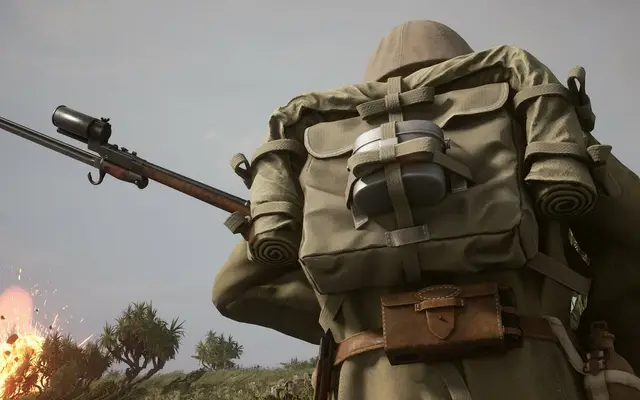
Real screenshots from the game. Click any of them to see it full size.
How much RAM does a Post Scriptum server need?
Find the row that sounds like your group and we will point you at the right plan.
| Your server | RAM | Plan |
|---|---|---|
| Seed or practice server around 40 players | 8 GB | Starter$19.99/mo |
| Full 80 player server | 12 GB | Standard$29.99/mo |
| 80 players with Workshop maps and mods | 16 GB | Pro$39.99/mo |
This is the panel. Click around.
This is the Post Scriptum panel you get. Click any button, or type a command.

Post Scriptum Server
play.gamezservers.com:7777
[12:00:00] Starting Post Scriptum server
[12:00:03] Loading world
[12:00:06] Server started on port 7777
[12:00:09] Ready for players. Try a button.
Power
How to join your Post Scriptum server
- 1
Launch Squad 44 on Steam.
- 2
If the server runs mods, subscribe to the same items on the Squad 44 Steam Workshop first.
- 3
Open the Server Browser and search for your server's name.
- 4
Select it and join, entering the password if the server has one.
Common problems
The game is now called Squad 44 on Steam, but the server files still use the PostScriptum folder and binary names. That is expected, nothing is broken.
Mods do not download to players from the server. Everyone has to subscribe to the same Workshop items before joining a modded layer.
Server Name in the panel is limited to 32 characters. For a longer name or special characters, edit ServerName in Server.cfg in the file manager.
Map rotation lives in MapRotation.cfg, and the panel fields rewrite Server.cfg on start, so make other Server.cfg changes only to lines the panel does not manage.
Server not responding
Make sure the server is online. Servers sleep after 4 days with nobody playing, and anyone with access can start them again from the dashboard in one click.
Use the server address
Do not use localhost, 127.0.0.1 or your own IP from a home hosting guide. Copy the exact address of the server.
No port forwarding or firewall changes
Opening ports on your router is only for hosting a server at home, so there is nothing to change to join this one. If Windows asks whether to let the game through the firewall, choose Allow.
Modding your Post Scriptum server
Squad 44 has Steam Workshop support for custom maps and overhauls, loaded from the server's Plugins/Mods folder. Larger community projects covering new fronts and factions are in development.
Post Scriptum server hosting, explained
Post Scriptum was renamed Squad 44 after Offworld Industries took it over in late 2023, but the game is the same: large World War II battles with up to 80 players, squads, tanks, artillery, logistics and a lot of radio chatter. A match is one long push across a big map from places like Normandy and Market Garden, where a good squad leader and a supply truck matter more than any one rifleman.
Clan servers and event nights are the backbone of this game, and both need a dedicated box. A server of your own lets a clan seed it with members, run organized events against other clans, or host a mod night. Reserved slots keep room for your regulars, and a stable name in the browser helps a community grow around it. Seeding matters too: a server only fills when a core group logs on early, and that is easier when the group owns the server.
Our panel covers the server name, max players, reserved slots, team balance, team change rules, public advertising, demo recording, auto update and RCON. Admin groups and permissions go in Admins.cfg, bans in Bans.cfg, layers in MapRotation.cfg, and welcome text in Motd.cfg and ServerMessages.cfg, all editable in the file manager. Workshop mod folders upload over SFTP into PostScriptum/Plugins/Mods. The live console shows each modded map as the server loads it, and a one click backup before a config change is cheap insurance.
A full 80 player WW2 battle with vehicles is a heavy load. A 40 player seed or practice server runs on 8 GB. For a full server at 80, take 12 GB, and if you run Workshop mods with large custom maps, 16 GB leaves headroom. Long rounds grow memory use as they go, so leave some slack. You can change plans at any time as the community grows.
Post Scriptum server guides
Post Scriptum5 min readHow to Add Admins to a Squad 44 Server (Admins.cfg and Commands)
Add admins on a Squad 44 (Post Scriptum) server: Admins.cfg groups and permissions, SteamID64 lines, reserved slot members and the admin commands.
ReadPost Scriptum5 min readHow to Add Workshop Mods to a Squad 44 (Post Scriptum) Server
Put Steam Workshop mods on a Squad 44 server: copy each mod folder into PostScriptum/Plugins/Mods, add the modded layers to the rotation and get players ready.
ReadPost Scriptum5 min readHow to Host a Squad 44 (Post Scriptum) Dedicated Server
Host a Squad 44 server, formerly Post Scriptum: SteamCMD app 746200, the PostScriptum ServerConfig files, ports 10027, 10037 and 21114, and seeding.
ReadIncluded on every plan
- Always on DDoS protection
- 24/7 support from real people
- Low ping game hardware
- Live the moment you pay
- Your own address and port
- Live console with full access
- One click game actions
- One click backups
- Upgrade or cancel any time
Common questions
Is Post Scriptum the same as Squad 44?
Yes. Offworld Industries renamed Post Scriptum to Squad 44 in late 2023. Servers and players are on the same game, and the server files keep the old PostScriptum names.
How many players can a Squad 44 server have?
Up to 80, which is our default. You can lower it and keep reserved slots for clan members.
How do I add admins?
Create a group with the permissions you want in Admins.cfg, add each admin's Steam ID to that group, and restart.
How do I change the map rotation?
Edit MapRotation.cfg in the PostScriptum/ServerConfig folder with the file manager, then restart the server.
Does the server support Workshop mods?
Yes. Copy the mod folders into PostScriptum/Plugins/Mods and restart. Players must subscribe to the same Workshop items.
Can I password the server?
Yes. Add ServerPassword to Server.cfg in the file manager and restart. Leave it empty for a public server.
Does the server update itself?
With Auto Update on, it checks for a new build on every start, so restart after a game patch.
How do I use RCON?
Set an RCON password in the panel and connect with an RCON tool to the RCON port shown there.
Is GamezServers affiliated with Post Scriptum?
No. You rent and control your own dedicated Post Scriptum server. GamezServers is not affiliated with the game's developer or publisher.
Can my friends and I split the cost?
Yes. At checkout choose "Me and my friends" and up to 10 people each pay their own share with their own card, on any plan length, from 3 days to a year. It is not a payment plan: nobody pays in parts over time, each friend simply pays their own share. You pay yours, send each friend their link, and the server starts straight away. Each share includes a $1 payment fee.
Can I build a custom plan?
Yes. Every game has a Build your own page: pick any amount of RAM up to 32 GB, any length from 3 days to 1 year, prepaid or a subscription, plus your server type and settings. A custom size costs 15% more per GB than the standard plans next to it.
Can I pay once instead of a subscription?
Yes. Pick Prepaid and pay once for 3 days, 30 days, 6 months or a year. Nothing renews: when the time is up the server pauses and keeps its world for 14 days. Add time or switch to a subscription from your panel any time. Short rentals cost more per day, since every server is set up from scratch.
How fast is setup, really?
Your server starts building the moment Stripe confirms payment. Most are online in under a minute, and the address and login appear on your dashboard automatically.
Players who host Post Scriptum also host

Your Post Scriptum server is a minute away
80 player WW2 battles for your clan, now under the Squad 44 name
Deploy Post Scriptum nowLive in 60 seconds · Cancel any time
GamezServers is not affiliated with Offworld Industries. Post Scriptum and its art are trademarks of their respective owners.