


Puck server hosting
Your own rink for pickup games and leagues.
A dedicated Puck server with a 200 Hz tick rate, your rules and your own admins. Run open pickup games, password protected club nights or competitive league matches with set teams.
Staying longer? Subscribe and get 50% off your first month
- DDoS protected
- 24/7 support
- Live the moment you pay
- Split the billUp to 10 friends, own cards
- Custom plansAny RAM up to 32 GB
- Prepaid or monthly3 days to 1 year
- Live in 60 secondsNo setup, no waiting
- Cancel any timeNo contracts, ever
Pick your Puck plan
Every plan is live the moment you pay. Upgrade or cancel from your dashboard any time.
Starter
1 GBThen $2.99/mo. $0.10 a day.
- 1 GB RAM
- 2 vCPU cores
- Up to 6 players
- DDoS protection included
- 24/7 support
Standard
2 GBThen $4.99/mo. $0.17 a day.
- 2 GB RAM
- 2 vCPU cores
- Up to 10 players
- DDoS protection included
- 24/7 support
Pro
3 GBThen $7.99/mo. $0.27 a day.
- 3 GB RAM
- 2 vCPU cores
- Up to 16 players
- DDoS protection included
- 24/7 support
What comes set up on a Puck server
200 Hz like official servers
Physics run on the server, so a steady tick rate is what makes stickhandling feel responsive. Raise or lower it from the panel.
5v5 and 6v6 lobbies
The Starter plan fits a full 6v6 with goalies. Bigger plans add room for spectators, subs and larger pickup lobbies.
League ready
Competitive mode puts listed Steam IDs on Blue and Red and everyone else in spectator, with a whitelist and password for private nights.
Game rules in the panel
Period length, number of periods, warmup, goalie crease protection and goal slow motion, no JSON editing needed.
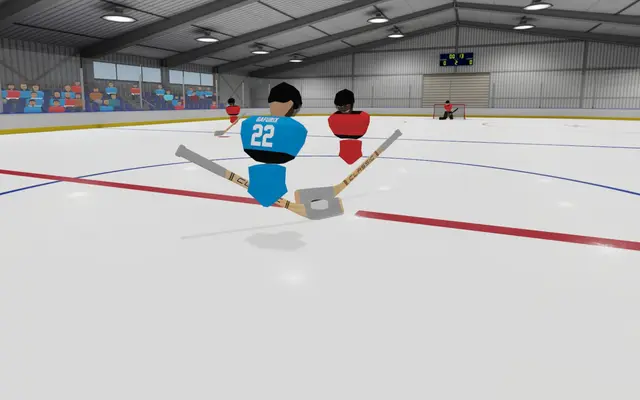
A look inside Puck
Real screenshots from the game. Click any of them to see it full size.
How much RAM does a Puck server need?
Find the row that sounds like your group and we will point you at the right plan.
| Your server | RAM | Plan |
|---|---|---|
| Pickup games and 6v6 with goalies, up to 12 players | 1 GB | Starter$2.99/mo |
| Busy public lobby with spectators or a few mods, up to 20 players | 2 GB | Standard$4.99/mo |
| Large lobbies and heavier mod lists, up to 32 players | 3 GB | Pro$7.99/mo |
This is the panel. Click around.
This is the Puck panel you get. Click any button, or type a command.

Puck Server
play.gamezservers.com:30609
[12:00:00] Starting Puck server
[12:00:03] Loading world
[12:00:06] Server started on port 30609
[12:00:09] Ready for players. Try a button.
Power
How to join your Puck server
- 1
Launch Puck and open the Server Browser from the main menu.
- 2
Search for
My Puck Server, or click Direct Connect. - 3
In Direct Connect, type
203.0.113.24in the IP address box and30609in the port box, then click Connect. - 4
Enter the password if you set one. Any mods the server needs download by themselves.
Common problems
IP and port go in separate boxes
Puck's Direct Connect has one box for the IP address and one for the port. Type 203.0.113.24 and 30609 separately, without the colon.
Server is still starting
A Puck server only lets players in after it has signed in to Puck's backend and downloaded its mods. Give it a minute after a start or restart.
Join from a link
With Steam running, opening steam://run/2994020//+ipAddress 203.0.113.24 +port 30609/ in a browser starts Puck and connects straight to the server.
Not in the server browser
Check that Public server is on in the panel, and clear the browser filters (full, empty, password protected, modded and max ping). Direct Connect always works.
Server not responding
Make sure the server is online. Servers sleep after 4 days with nobody playing, and anyone with access can start them again from the dashboard in one click.
Use the server address
Do not use localhost, 127.0.0.1 or your own IP from a home hosting guide. Copy the exact address of the server.
No port forwarding or firewall changes
Opening ports on your router is only for hosting a server at home, so there is nothing to change to join this one. If Windows asks whether to let the game through the firewall, choose Allow.
Modding your Puck server
Puck mods come from the Steam Workshop. Add a mod's Workshop id to the mods list in server_config.json with isEnabled and isClientRequired, and the server downloads it on start. Client required mods download to every player automatically when they connect, and server only mods like custom MOTDs or commands run just on the server.
Puck server hosting, explained
A Puck dedicated server is a free Linux program from the game's developer, installed through SteamCMD as app 3481440. Puck runs its physics on the server, so every stick movement, check and shot is simulated there and sent to players. That makes the server's tick rate and the distance between players and the server the two things that decide how the game feels. Official cloud servers run at 200 Hz, and so do ours by default.
Current builds read server_config.json for its name, port, player limit, password, tick rate, voice chat, whitelist, mods and game mode. Game rules live in two more files: public_game_mode_config.json for normal pickup games and competitive_game_mode_config.json for league play, where teamAssignments lists the SteamID64s on Blue and Red and everyone else spectates. Period length, number of periods, warmup, goalie crease protection and goal slow motion are settings in our panel and are written into both files on every start. Admins, bans and the whitelist are plain lists of SteamID64s in admin_steam_ids.json, banned_steam_ids.json and whitelisted_steam_ids.json, which the server reloads the moment they change.
Puck is one of the lightest games to host: one server uses about 300 MB of memory, so even our 1 GB plan has plenty of room. What matters more is a fast CPU core to hold 200 Hz with a full rink, and one game port that answers UDP for gameplay and TCP for the server browser ping. Our servers have that port open from the start, so there is nothing to forward, and admin commands like /kick, /ban, /pause and /skip are typed in the in game chat by the Steam IDs you list as admins.
Puck server guides
Puck7 min readHow to Host a Puck Server (Step by Step, 2026)
Host a Puck hockey server in about a minute: pick a plan from 2.99 USD, set the password and game rules, add admins, and join with Direct Connect.
ReadPuck6 min readHow to Host a Puck Server for Free (2026, After the Patreon Change)
How to host a Puck server for free in 2026: self host from the game, run the free dedicated server (app 3481440) on a spare PC, and the limits of each.
ReadPuck5 min readPuck Network Buffering Explained: Best Setting for Less Lag
Puck's Network Buffering setting explained: Predictive, Responsive, Balanced and Smooth, the latency each adds and which to pick for your connection.
ReadPuck5 min readPuck Patch Notes 2026: Matchmaking, B1153 and Rewired (B1235)
Puck patch notes 2026 explained: B897 matchmaking, B1153 crease protection and Patreon cloud servers, B1235 Rewired netcode, and what it means for servers.
ReadPuck4 min readHow to Add Mods to a Puck Server (Steam Workshop, 2026)
Add Steam Workshop mods to a Puck dedicated server with the mods list in server_config.json: server side and client required mods, isEnabled, isClientRequired and fixes.
ReadPuck4 min readHow to Join a Puck Server: Direct Connect, Browser and Links (2026)
Join a Puck dedicated server by IP and port with Direct Connect, from the server browser, or with a steam:// join link, plus passwords, mods and what each error means.
ReadIncluded on every plan
- Always on DDoS protection
- 24/7 support from real people
- Low ping game hardware
- Live the moment you pay
- Your own address and port
- Live console with full access
- One click game actions
- One click backups
- Upgrade or cancel any time
Common questions
How many players can join a Puck server?
The player limit follows your plan: 12 on Starter, which fits 6v6 with goalies, 20 on Standard and 32 on Pro. Spectators count toward the limit, and admins can join even when the server is full.
How do I make myself admin?
Add your SteamID64 (the 17 digit number in your Steam profile link or on a site like steamid.io) to Admin Steam IDs in the panel and restart, or edit admin_steam_ids.json in Files. Admins can use /kick, /ban, /unban, /start, /warmup, /pause, /resume and /skip in chat. Type /help in game to see every command available to you.
Is there a server console for commands?
No. The Puck server does not read console commands, so every admin command is typed in the in game chat by a listed admin. The panel console shows the server log, joins and leaves.
Can I run a private league or club server?
Yes. Set a join password, turn on Whitelist and list your players' SteamID64s, or switch Game mode to competitive and put each team's Steam IDs under Blue and Red in competitive_game_mode_config.json. Players not on a team spectate.
How do I change the period length?
Set Period length (in seconds, 300 is 5 minutes), Periods and Warmup length in the panel and restart. They apply to both the public and competitive game modes.
Do I need to port forward?
No. Port forwarding is only for hosting Puck on your own PC. Your server has its own public address with the game port already open for UDP and TCP.
Does it update when Puck patches?
Yes. The server checks Steam for a new build every time it starts, so restart it after a Puck update and everyone stays on the same version.
Can I add Steam Workshop mods?
Yes. Add each mod to the mods list in server_config.json as { "id": "WORKSHOP_ID", "isEnabled": true, "isClientRequired": false } and restart. Set isClientRequired to true for mods every player needs, and Puck downloads them for players as they join.
Can my friends and I split the cost?
Yes. At checkout choose "Me and my friends" and up to 10 people each pay their own share with their own card, on any plan length, from 3 days to a year. It is not a payment plan: nobody pays in parts over time, each friend simply pays their own share. You pay yours, send each friend their link, and the server starts straight away. Each share includes a $1 payment fee.
Can I build a custom plan?
Yes. Every game has a Build your own page: pick any amount of RAM up to 32 GB, any length from 3 days to 1 year, prepaid or a subscription, plus your server type and settings. A custom size costs 15% more per GB than the standard plans next to it.
Can I pay once instead of a subscription?
Yes. Pick Prepaid and pay once for 3 days, 30 days, 6 months or a year. Nothing renews: when the time is up the server pauses and keeps its world for 14 days. Add time or switch to a subscription from your panel any time. Short rentals cost more per day, since every server is set up from scratch.
How fast is setup, really?
Your server starts building the moment Stripe confirms payment. Most are online in under a minute, and the address and login appear on your dashboard automatically.
Players who host Puck also host

IOSoccer
Sports · Competitive · PvP · Free to play

BATTALION: Legacy
Shooter · PvP · Competitive · Free to play
Counter-Strike: Source
Shooter · Competitive · PvP · Modded

Medal of Honor: Allied Assault
Shooter · PvP · Retro · Competitive

Your Puck server is a minute away
Your own rink for pickup games and leagues.
Deploy Puck nowLive in 60 seconds · Cancel any time
Puck is developed and published by NS7. GamezServers is not affiliated with or endorsed by NS7.