


Open Fortress server hosting
Bunny hops, groovy guns and deathmatch nights on your own server
Host an Open Fortress alpha server for free for all deathmatch with up to 32 players. Pick the start map and player cap, add custom maps, and run it all day.
Staying longer? Subscribe and get 50% off your first month
- DDoS protected
- 24/7 support
- Live the moment you pay
- Split the billUp to 10 friends, own cards
- Custom plansAny RAM up to 32 GB
- Prepaid or monthly3 days to 1 year
- Live in 60 secondsNo setup, no waiting
- Cancel any timeNo contracts, ever
Pick your Open Fortress plan
Every plan is live the moment you pay. Upgrade or cancel from your dashboard any time.
Starter
2 GBThen $4.99/mo. $0.17 a day.
- 2 GB RAM
- 2 vCPU cores
- DDoS protection included
- 24/7 support
Standard
4 GBThen $9.99/mo. $0.33 a day.
- 4 GB RAM
- 2 vCPU cores
- DDoS protection included
- 24/7 support
Pro
8 GBThen $19.99/mo. $0.67 a day.
Splitting with 3 friends? $6.02 each/mo
- 8 GB RAM
- 2 vCPU cores
- DDoS protection included
- 24/7 support
What comes set up on a Open Fortress server
Arena deathmatch, 32 slots
Set Max Players up to 32 in the panel. Smaller caps keep tight maps readable, bigger ones turn dm_2fort into chaos.
Your own map pool
Upload community .bsp maps over SFTP and switch to them with changelevel, or make one the Default Map so the server boots into it.
Full Source console
Kick, change maps and tune cvars from the live console in the panel, the same commands you already know from other Source servers.
Split it with the regulars
A deathmatch night server is cheap to run, and up to 10 friends can each pay their share of the bill.
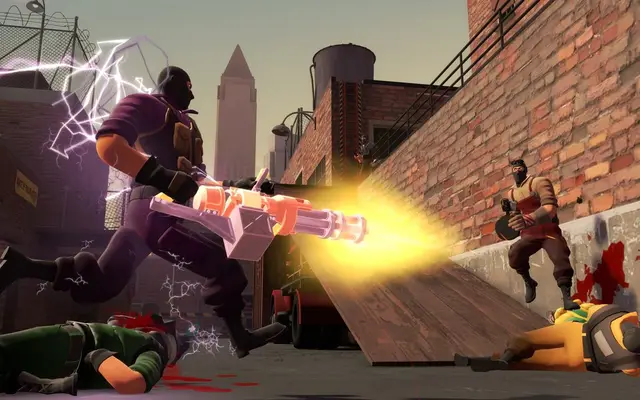
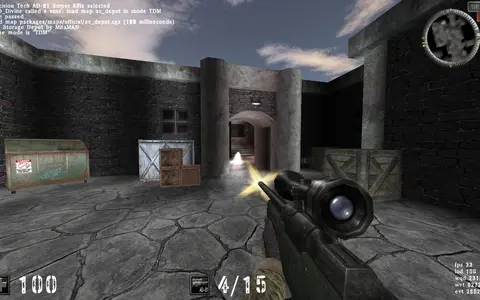
A look inside Open Fortress
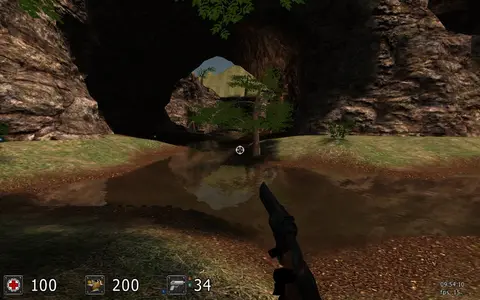
Real screenshots from the game. Click any of them to see it full size.
How much RAM does a Open Fortress server need?
Find the row that sounds like your group and we will point you at the right plan.
| Your server | RAM | Plan |
|---|---|---|
| Deathmatch night for a friend group | 2 GB | Starter$4.99/mo |
| Full 32 slot public server | 4 GB | Standard$9.99/mo |
| Large custom map pool with extra configs | 8 GB | Pro$19.99/mo |
This is the panel. Click around.
This is the Open Fortress panel you get. Click any button, or type a command.
Open Fortress Server
play.gamezservers.com:7777
[12:00:00] Starting Open Fortress server
[12:00:03] Loading world
[12:00:06] Server started on port 7777
[12:00:09] Ready for players. Try a button.
Power
How to join your Open Fortress server
- 1
Install Team Fortress 2 and Source SDK Base 2013 Multiplayer from Steam, then install the Open Fortress alpha with the Beans installer from openfortress.fun.
- 2
Restart Steam and launch Open Fortress from your library.
- 3
Open the developer console (enable it in the keyboard options if it is off).
- 4
If the server has a password, type
password yourpasswordand press Enter. - 5
Type
connectand press Enter.203.0.113.24
Common problems
Our server runs the alpha build that players get from the official download page. The developers say the Steam release will differ from the alpha, so check what your group is running before a match night.
Players see an empty list or a version error after an alpha update? Restart the server from the panel so it pulls the same update, then have everyone run the Beans updater again.
The alpha needs both Team Fortress 2 and Source SDK Base 2013 Multiplayer installed on Steam. If the game will not start, one of those two is usually missing.
To lock the server, add sv_password yourpassword to server.cfg in the file manager. Players then type password yourpassword in the console before connect.
Server not responding
Make sure the server is online. Servers sleep after 4 days with nobody playing, and anyone with access can start them again from the dashboard in one click.
Use the server address
Do not use localhost, 127.0.0.1 or your own IP from a home hosting guide. Copy the exact address of the server.
No port forwarding or firewall changes
Opening ports on your router is only for hosting a server at home, so there is nothing to change to join this one. If Windows asks whether to let the game through the firewall, choose Allow.
Open Fortress server hosting, explained
Open Fortress started as a Team Fortress 2 mod and grew into its own fast arena shooter. It keeps the Source engine movement, adds bunny hopping, and swaps class balance for straight gunfights with a 1970s action movie look, its own weapons and its own maps. Free for all deathmatch is the heart of it. Get Psyched Games has a free Steam release listed for 2026, and until then the alpha is the version people play online.
Arena shooters only feel right on a stable server. A dedicated box gives your group a fixed place to warm up, run a weekly deathmatch night or settle scores, without one player's home upload deciding everyone's ping. Players who drift away from the alpha scene often come back for organized nights, and a server that is always there with a known address makes those easy to run.
In the panel you set the Default Map, which is dm_2fort out of the box, and Max Players up to 32. Everything else works the way Source admins expect: server.cfg for the hostname, password and round settings, changelevel in the live console, and custom .bsp maps uploaded to the maps folder with the file manager or SFTP. Backups take one click, so save one before you rework your config.
Source servers are light. The game logic barely touches memory at this player count, so a friend group fits on 2 GB and a full 32 slot server sits comfortably on 4 GB. Only move to 8 GB if you stack a big custom map collection or run several heavy configs. If nobody is on for 4 days, the optional Sleep when empty setting stops the server until someone wakes it.
Open Fortress server guides
How to Add Custom Maps to an Open Fortress Server
Upload custom .bsp maps to an Open Fortress server, build a mapcycle.txt, switch maps with changelevel and set up downloads so players get the map on join.
ReadHow to Host an Open Fortress Server (Alpha Dedicated Server)
Host an Open Fortress alpha server: the SDK 2013 and TF2 server files, the Beans updater, gameinfo.txt, server.cfg, port 27015 and how players connect.
ReadOpen Fortress Server Not Showing or Version Mismatch (Fixes)
Open Fortress server missing or players get a version error? Match alpha builds with Beans, check sv_lan, port 27015, passwords and SDK installs.
ReadIncluded on every plan
- Always on DDoS protection
- 24/7 support from real people
- Low ping game hardware
- Live the moment you pay
- Your own address and port
- Live console with full access
- One click game actions
- One click backups
- Upgrade or cancel any time
Common questions
How many players can an Open Fortress server have?
Our setup starts at 24 and lets you raise Max Players to 32 in the panel. Deathmatch on small maps often plays better around 12 to 16.
Is Open Fortress free?
Yes. The alpha is free from openfortress.fun and the Steam release is also listed as free. You need Team Fortress 2 and Source SDK Base 2013 Multiplayer on Steam to run the alpha, and both are free.
Which version does the server run?
It installs the current alpha through the official Beans updater, the same build players download. The developers say the coming Steam release will differ from the alpha, so expect changes when it lands.
How do I change the map?
Set Default Map in the panel for the map it boots into. While it runs, type changelevel followed by the map name in the console.
Can I add custom maps?
Yes. Upload the .bsp files to the open_fortress/maps folder with the file manager or SFTP, then load them with changelevel. Players without the map will need a copy of it.
How do I password my server?
Add sv_password to server.cfg in the file manager and restart. Players type password followed by the password in their console before connecting.
Is Open Fortress made by Valve?
No. It is a fan project built on Valve's Source SDK and is not affiliated with Valve.
How much RAM does it need?
Very little. 2 GB covers a small group, 4 GB a full 32 slot server, and 8 GB is only for very large custom map pools.
Is GamezServers affiliated with Open Fortress?
No. You rent and control your own dedicated Open Fortress server. GamezServers is not affiliated with the game's developer or publisher.
Can my friends and I split the cost?
Yes. At checkout choose "Me and my friends" and up to 10 people each pay their own share with their own card, on any plan length, from 3 days to a year. It is not a payment plan: nobody pays in parts over time, each friend simply pays their own share. You pay yours, send each friend their link, and the server starts straight away. Each share includes a $1 payment fee.
Can I build a custom plan?
Yes. Every game has a Build your own page: pick any amount of RAM up to 32 GB, any length from 3 days to 1 year, prepaid or a subscription, plus your server type and settings. A custom size costs 15% more per GB than the standard plans next to it.
Can I pay once instead of a subscription?
Yes. Pick Prepaid and pay once for 3 days, 30 days, 6 months or a year. Nothing renews: when the time is up the server pauses and keeps its world for 14 days. Add time or switch to a subscription from your panel any time. Short rentals cost more per day, since every server is set up from scratch.
How fast is setup, really?
Your server starts building the moment Stripe confirms payment. Most are online in under a minute, and the address and login appear on your dashboard automatically.

Your Open Fortress server is a minute away
Bunny hops, groovy guns and deathmatch nights on your own server
Deploy Open Fortress nowLive in 60 seconds · Cancel any time
GamezServers is not affiliated with Get Psyched Games. Open Fortress and its art are trademarks of their respective owners.