


Wreckfest server hosting
Your own Wreckfest lobby for derbies, banger races and mower nights
Host a Wreckfest server for up to 24 drivers: your own event loop of races and derbies, bots to fill the grid, Workshop mods and admins set by Steam ID.
Staying longer? Subscribe and get 50% off your first month
- DDoS protected
- 24/7 support
- Live the moment you pay

- Split the billUp to 10 friends, own cards
- Custom plansAny RAM up to 32 GB
- Prepaid or monthly3 days to 1 year
- Live in 60 secondsNo setup, no waiting
- Cancel any timeNo contracts, ever
Pick your Wreckfest plan
Every plan is live the moment you pay. Upgrade or cancel from your dashboard any time.
Starter
2 GBThen $4.99/mo. $0.17 a day.
- 2 GB RAM
- 2 vCPU cores
- DDoS protection included
- 24/7 support
Standard
4 GBThen $9.99/mo. $0.33 a day.
- 4 GB RAM
- 2 vCPU cores
- DDoS protection included
- 24/7 support
Pro
6 GBThen $14.99/mo. $0.50 a day.
Splitting with 3 friends? $4.77 each/mo
- 6 GB RAM
- 2 vCPU cores
- DDoS protection included
- 24/7 support
What comes set up on a Wreckfest server
Your event loop
Chain tracks, modes, laps and weather with el_add lines, so the lobby flows from a figure 8 race into a last car standing derby.
Bots fill the grid
Add up to 24 bots so a group of four still lines up against a full field of wrecks.
Mods on the server
Load Workshop car and track mods by folder name with the mods setting, as long as every driver subscribes to the same ones.
Admins by Steam ID
List admins and moderators with admin_steam_ids and op_steam_ids, and stop random joiners from taking owner rights.
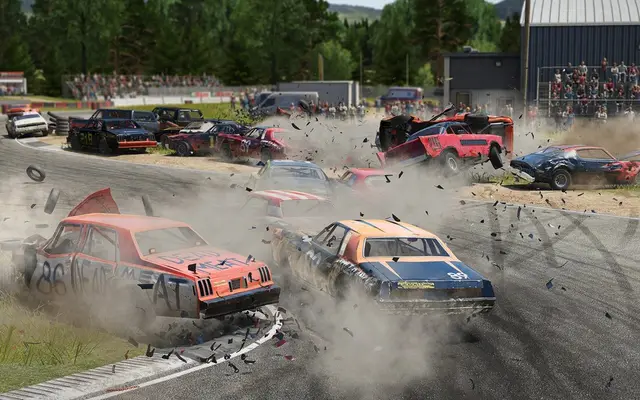
A look inside Wreckfest
Real screenshots from the game. Click any of them to see it full size.
How much RAM does a Wreckfest server need?
Find the row that sounds like your group and we will point you at the right plan.
| Your server | RAM | Plan |
|---|---|---|
| Small lobby of friends with a few bots | 2 GB | Starter$4.99/mo |
| Full 24 car grid | 4 GB | Standard$9.99/mo |
| Full grid with several Workshop mods | 6 GB | Pro$14.99/mo |
This is the panel. Click around.
This is the Wreckfest panel you get. Click any button, or type a command.

Wreckfest Server
play.gamezservers.com:7777
[12:00:00] Starting Wreckfest server
[12:00:03] Loading world
[12:00:06] Server started on port 7777
[12:00:09] Ready for players. Try a button.
Power
How to join your Wreckfest server
- 1
Launch Wreckfest and choose Multiplayer from the main menu.
- 2
Open the server browser and search for your server's name.
- 3
Select it and join, then enter the password from your panel if you set one.
- 4
If the server runs mods, subscribe to the same mods on the Steam Workshop first.
Common problems
By default the first player to join becomes owner and can change the event. Set owner_disabled=1 and list your own SteamID64 in admin_steam_ids instead.
Drivers kicked for missing content need the exact same Workshop mods the server loads. Share the list of mods before race night.
Lines in server_config.cfg that start with # are ignored. Remove the # when you fill in a setting, then restart.
Bots take grid slots, and the total cap is 24. Lower bots if real players cannot get in.
Server not responding
Make sure the server is online. Servers sleep after 4 days with nobody playing, and anyone with access can start them again from the dashboard in one click.
Use the server address
Do not use localhost, 127.0.0.1 or your own IP from a home hosting guide. Copy the exact address of the server.
No port forwarding or firewall changes
Opening ports on your router is only for hosting a server at home, so there is nothing to change to join this one. If Windows asks whether to let the game through the firewall, choose Allow.
Modding your Wreckfest server
Wreckfest has a big Steam Workshop scene for cars, tracks and tweaks. The server loads mod folders listed in the mods setting, and players subscribe to the same items on the Workshop.
Wreckfest server hosting, explained
Wreckfest is Bugbear's demolition racer, where cars bend and tear with soft body damage and a race is as much about putting a rival into the wall as crossing the line. Lobbies switch between track races, figure 8 crossovers and last car standing derbies, and the DLC adds the silly stuff like lawnmowers, sofas on wheels and combines. It came out in 2018 and still has a loyal online crowd, even with Wreckfest 2 in Early Access.
A dedicated server gives a group a lobby that is always up with their own rules. Regular race nights run an event loop of favorite tracks, leagues lock cars to one class with car_class_restriction, and derby fans set vehicle_damage to realistic and let it rip. Admins listed by Steam ID can kick, ban and change events from chat, so the first random joiner never takes over.
In the panel you set the server name, password and config file, and automatic updates keep the server matched to the game. Everything else lives in server_config.cfg in the file manager: max players, bots, game mode, track, laps, car class and car restrictions, damage, special vehicles, welcome message, the event loop and the mods list. Changes apply on the next restart, so you can line up a new event loop before race night.
There is no persistent world, so the server is light. A small lobby with friends and a few bots runs on 2 GB, a full 24 car grid on 4 GB, and 6 GB gives room for a stack of Workshop mods. CPU matters more than memory once 24 cars start crashing into each other, since every collision and bent panel is simulated on the server. Pick a bigger plan if you plan to run mod heavy events every night.
Wreckfest server guides
Wreckfest4 min readHow to Host a Wreckfest Dedicated Server (PC Guide)
Host a Wreckfest dedicated server: SteamCMD app 361580, server_config.cfg, ports 27015, 27016 and 33540, admins by SteamID64, bots, event loops and mods.
ReadWreckfest4 min readWreckfest Server Not Showing in Server Browser (Fixes)
Wreckfest server missing from the browser or drivers cannot join? Fix the query port, version mismatch, lan=0, filters, passwords and mod kicks.
ReadWreckfest5 min readWreckfest server_config.cfg and Event Loop Explained
What the settings in Wreckfest's server_config.cfg do, how to build an event loop with el_add lines, and how to set admins, bots, damage, car classes and mods.
ReadIncluded on every plan
- Always on DDoS protection
- 24/7 support from real people
- Low ping game hardware
- Live the moment you pay
- Your own address and port
- Live console with full access
- One click game actions
- One click backups
- Upgrade or cancel any time
Common questions
How many players can join a Wreckfest server?
Up to 24, and that includes bots. Set max_players and bots in server_config.cfg to balance real drivers and AI.
How do I make myself admin?
Add your 17 digit SteamID64 to admin_steam_ids in server_config.cfg and restart. Use op_steam_ids for moderators, and set owner_disabled=1 so the first joiner does not get owner rights.
How do I set up a rotation of events?
Use the event loop in server_config.cfg: one el_add line per track, with el_gamemode, el_laps and el_weather under it. The server cycles through them in order.
Can I run mods on a Wreckfest server?
Yes. Upload the mod folders over SFTP and list their folder names, comma separated, in the mods setting. Every player needs the same mods from the Steam Workshop.
Can I add bots?
Yes. The bots setting fills the grid with 0 to 24 AI cars. Bots count toward the 24 car limit.
Can I make my Wreckfest server private?
Yes. Set a Server Password in the panel and only drivers who know it can join.
Does Wreckfest have crossplay with consoles?
No. Dedicated servers are for the PC version on Steam, and console players use their own platform's matchmaking.
Do I need to own Wreckfest to run the server?
No. The dedicated server is a separate free download we install for you. Every driver needs their own copy of the game.
Is GamezServers affiliated with Wreckfest?
No. You rent and control your own dedicated Wreckfest server. GamezServers is not affiliated with the game's developer or publisher.
Can my friends and I split the cost?
Yes. At checkout choose "Me and my friends" and up to 10 people each pay their own share with their own card, on any plan length, from 3 days to a year. It is not a payment plan: nobody pays in parts over time, each friend simply pays their own share. You pay yours, send each friend their link, and the server starts straight away. Each share includes a $1 payment fee.
Can I build a custom plan?
Yes. Every game has a Build your own page: pick any amount of RAM up to 32 GB, any length from 3 days to 1 year, prepaid or a subscription, plus your server type and settings. A custom size costs 15% more per GB than the standard plans next to it.
Can I pay once instead of a subscription?
Yes. Pick Prepaid and pay once for 3 days, 30 days, 6 months or a year. Nothing renews: when the time is up the server pauses and keeps its world for 14 days. Add time or switch to a subscription from your panel any time. Short rentals cost more per day, since every server is set up from scratch.
How fast is setup, really?
Your server starts building the moment Stripe confirms payment. Most are online in under a minute, and the address and login appear on your dashboard automatically.
Players who host Wreckfest also host


Your Wreckfest server is a minute away
Your own Wreckfest lobby for derbies, banger races and mower nights
Deploy Wreckfest nowLive in 60 seconds · Cancel any time
GamezServers is not affiliated with Bugbear Entertainment. Wreckfest and its art are trademarks of their respective owners.